Showing posts with label Personalization. Show all posts

Friday, November 18, 2011

WidgetLocker Lockscreen v2.3.3 APK


Customize your lock screen !


WidgetLocker Lockscreen v2.3.3 market.android.com.widgetlocker
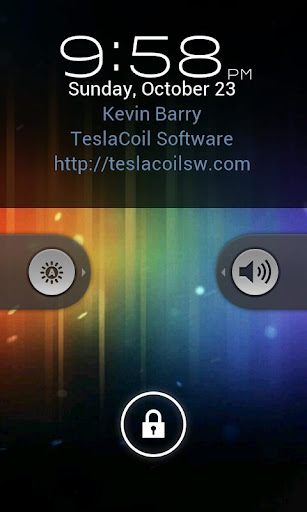
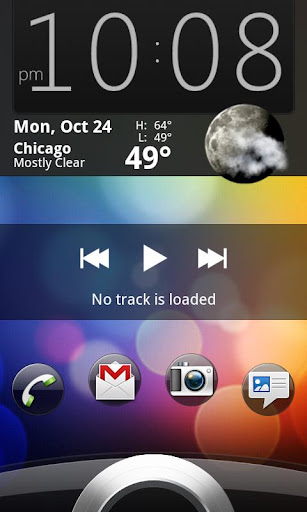
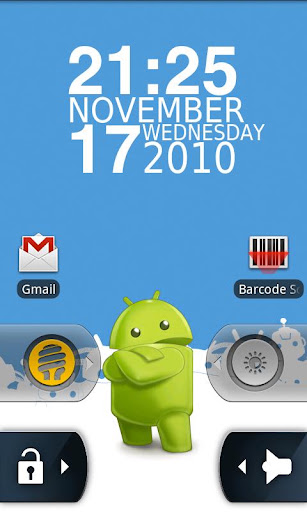
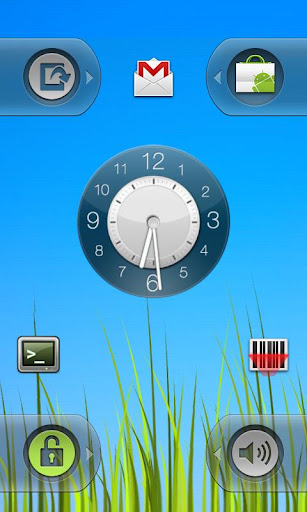
WidgetLocker is a lock screen replacement that puts you in control of the look, feel and layout of your lock screen.
  • Drag and Drop placement of Sliders, Android Widgets and App Shortcuts 
  • Sliders look selectable from built-in styles (Ice Cream Sandwich, Gingerbread, Sense and Sense 3, Motorola, iPhone, and Rotary) or from user-themes. 
  • Slider Actions can be customized, for example Slide-to-launch-Camera or Slide-to-call-your-Girlfriend. 
  • Resizable widgets and custom grid size 
  • Notification badges on apps/sliders via ADWNotifier 
  • Customize which widgets/buttons are allowed or blocked at the lock screen 
Required Android O/S : 2.1+

Screenshots :


Download : 3Mb APK

Continue Reading »

Thursday, November 17, 2011

VTL.Launcher 1.7.0 APK


VTL.Launcher - Tablet Optimized - Scrolling Docks - Scrolling Widgets - And More !


VTL.Launcher 1.7.0market.android.com.vtlab.launcher
VTL.Launcher - Tablet Optimized - Scrolling Docks - Scrolling Widgets - And More
VTL.Launcher is a Tablet Optimized Home Screen Replacement App. This app is based off ADW and is ADW Themes Compatible.


Features:
  • tablet layout optimized (smaller screens will need to play with desktop layout and dock icon size)
  • 3D Screen Transitions (NEW)
  • elastic scrolling
  • 3 individually configurable/toggleable scrollable dock bars designed to maximize tablet layouts
  • Show/Hide Buttons for side docks (NEW)
  • individual controls per dock for background/reflection/visibility/icon size
  • icon size for docks can be set different per orientation
  • user folders to place shortcuts to apps, bookmarks, contacts, etc.
  • icon changing for user folders and apps.
  • quick action items menu when long pressing apps, folders and widgets.
  • catalogs for organizing apps in the app drawers
  • swipe actions on app drawer to navigate catalogs
  • uncataloged catalog where new and uncatagorized apps fall
  • 1 to 7 homes screens with sense-like previews
  • configurable action bindings (swipe up, swipe down, home button)
  • long-hold uninstall on trashcan
  • moveable trashcan
  • hide homescreen icon labels
  • auto rotate orientation
  • system persistence with configurable locked orientation
  • widget size spanning
  • scrollable widget support
  • live wallpaper support
  • fullscreen mode
  • backup/restore settings
  • compatible with "most" ADW Themes
Newer Features : 
  • 3D Screen Transitions. (off by default)
  • Side Dockbar Show/Hide Buttons. (can be turned on/off in settings)
  • Icon number per dock is now dynamic depending on dock width, orientation and icon spacing.
  • Settings for Icon Spacing per Dock per Orientation.
  • Icons on Dock now have a dynamically set Layout Alignment/Gravity per Dock per Orientation.
  • Settings for Icon Alignment/Gravity per Dock per Orientation.
  • Individual Dock Controls for Icon Sizing Per Orientation (really large icons could look pixelated). 
  • The Ability to Add/Remove the Bottom Dock. Side Docks Expand to claim the gap left. 
  • Individual Dock Controls for Background/Reflection. 
  • Individual Dock Controls for whether a dock should be displayed with the app drawer. 
  • Ability to Lock Orientation either Landscape/Portrait for persistence option. 
  • Icon Changing for User Folders. New Icons then show up on desktop and in Docks. 
  • Revert to Default option for Icon Changes on items. 
  • UnCataloged Catalog for items which you haven't placed in a catalog. New apps land here. This must be turned on in settings. 
  • Quick Action Item to choose Catalog. 
  • Quick Action menu capability to the app drawers. Long press any icon in drawer and don't move it. 
  • Swipe to change catalogs in the drawer. Up/down in the Horizontal drawer and left/right in the Vertical. 
  • Catalog name to the top of the app drawers.
Required Android O/S : 2.0-2.3.3

Screenshots :
 

Download : 1Mb APK


Continue Reading »

ProfileComfort v1.0.7 apk


Create custom profiles, fast and simple; this app does the rest – automatically !


ProfileComfort v1.0.7market.android.com.incowia
For example you may define a profile for your job: Just set the workplace or working time as a condition and tell your smartphone how to act!
In this manner profiles for each area of your life can be created, like “Home”, “Night” and “Cinema”. The smartphone will automatically adapt to your lifestyle.


All conditions:
  • Time, date, weekday
  • Place
  • Incoming call
  • Low battery
  • Ambience noise
All actions:
  • Ring tone
  • Ring tone volume
  • Mute
  • Vibration, WiFi, Bluetooth ON/OFF
  • Airplane mode
  • Send SMS/email
  • Notification on statusbar
Required Android O/S : 2.1+

Screenshots :


Download : 630Kb APK


Continue Reading »

3D Globe Visualization Pro v1.0 apk


3D Globe is an open platform for geographic data visualization !


3D Globe Visualization Pro v1.0market.android.com..globe
3D Globe is an open platform for geographic data visualization. It can display your data on a globe in a lively and up-to-date form.
We provide customized data visualization service. Send us your data set, we will generate your own data visualization globe.


Features:
  • Well implemented & optimized by OpenGL 2.0
  • Latitude / longitude data spikes
  • Color gradients, based on data value or type
  • 4 globe textures and 3 data set
  • Viewport and zoom can be controlled by fingers
  • Can be installed to SD Card
  • More features are under development.
Required Android O/S : 2.2+

Screenshots :


Download : 1Mb APK


Continue Reading »

Windows Phone Android v1.3.1 apk


Windows Phone Metro UI for Android devices. Highly detailed UI to resemble WP7 !


Windows Phone Android v1.3.1market.android.com.wp7pro
Windows Phone Metro UI for Android devices. Highly detailed UI to resemble WP7
Windows Phone Android is a Android Launcher made to resemble Windows Phone's Metro UI.
Recommended 480x800. (NOT WORKING ON SOME SAMSUNGS AND MOTOROLAS) YMMV.


Required Android O/S : 2.1+

Screenshots :

Download : 500Kb APK


Continue Reading »

Tuesday, November 15, 2011

aniFlipClock v3.8.0 apk


Animated FlipClock. Customizable and use as widget, live wallpaper or real app !


aniFlipClock v3.8.0market.android.com.flip
Animated FlipClock. Customizable and use as widget, live wallpaper or real app.Animated 3D Flip Clock as LiveWallpaper , WIDGET and beautiful and wonderful fullscreen application.

Features : 
  • Stylish 70s Flip Clock letters from RICOH clock
  • (NEW) SUPPORT FOR THEMES (YELLOW, WHITE, PINK, EMBOSSED available for free in the market)
  • Smooth animation, especially LiveWallpaper reacts very well:
  • It is visible on your LockScreen and every homescreen
  • You can drag and drop it anywhere on the screen
  • Select a background-image or style a custom gradient
  • OnTouch-Menu gives you good possibilities
  • compatible with LAUNCHER PRO and Cyanogen MOD
  • app shows Hours, Minutes, Seconds, Weekday, Month, Date
  • Widget is in size 4x1 and shows up hours and minutes, with optional blinking dots, 12 or 24 hours mode.....
  • Application shows up Weekday, Day of Month, Month, Hours, Minutes, Seconds, all ANIMATED
  • Live Wallpaper shows up really nice in combination with locking screen and is visible on all homescreens.
  • choose your favorite background (image and colors) and style the gradient to your likes.
  • Define the widget or live wallpaper as an application-launcher: choose one app from all of your apps and just tap or douple-tap on the aniFlipClock
Required Android O/S : 2.0.1+

Screenshots :


Download : 4.8Mb APK


Continue Reading »